Message Rules
The rules in this chapter are for Journal traffic sources only. Equivalent rules for Gateway Mode (formerly SMTP/Inline traffic sources) can be created on the Configuration pages. See Configuration Settings for more information.
Message rules are deprecated and will be removed on May 18, 2026. Your rules are still available and functioning, but you cannot add new rules.
You should recreate any Message Rule functionality using the new Policy exceptions rules under Configuration > Policy settings. Once your rules are migrated, Policy exceptions will take precedence over message rules. For information on creating Policy exceptions, see Policy Exceptions.
Message rules allow you to specify that some types of messages should not be remediated or scanned.
Allow List and Verdict Override rules are not available for businesses in No Authentication mode.
Bypass Analysis rules have been renamed and migrated to Global settings > Message bypass rules.
Create and manage your message rules from the Administration > Message Rules page.
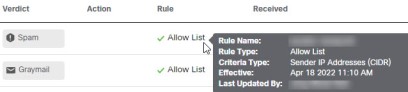
Message bypass rules take precedence over Allow List and Verdict Override rules. If a message is affected by a rule, it is indicated in the Rule column of the Messages page. Hover your cursor over the item in the Rule column to see which rule was applied.
Rules do not automatically apply to sub-domains. Domains are matched exactly as indicated in a rule.